TimeMachine 是 MacOs 系统自带的备份工具。备份系统和文件,具体介绍和使用,可以参考以下文章:
- 教程(一):设置 Time Machine 备份你的 Mac
- 教程(二):在 Time Machine 磁盘创建不同分区
- 教程(三):为你的备份加把锁
- 教程(四):排除特定文件(夹)的备份
- 教程(五):如何查看、恢复特定文件
- 教程(六):如何手动删除 Time Machine 备份
- 教程(七):使用 Time Machine 备份将音乐数据迁移至新 Mac
看完以上文章,能解决 TimeMachine 日常使用中遇到的 90% 问题。
下面介绍几个小技巧,也是自己遇到,然后学习到小技巧。
新电脑初始化
拿到新电脑,还在不停的安装 app,不停的调整配置吗?
TimeMachine 统统帮你解决。
ps:电脑对拷贝也行,但是我嫌慢。
在使用 timemachine 还原电脑有以下几点我没解决:
- 备份带密码,还原的时,不知道如何输入密码,电脑无法识别备份
- 网络备份,timemachine 备份通过网络备份,不知道如何通过网络备份还原
备份规则调整
默认备份规则
时间机器会保留:
- 本地快照(只要空间允许)
- 过去24小时的每小时备份
- 过去一个月的每日备份
- 过去所有月份的每周备份 当备份磁盘装满时,最早的备份会被删除。
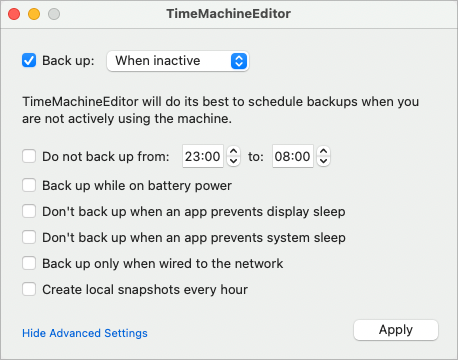
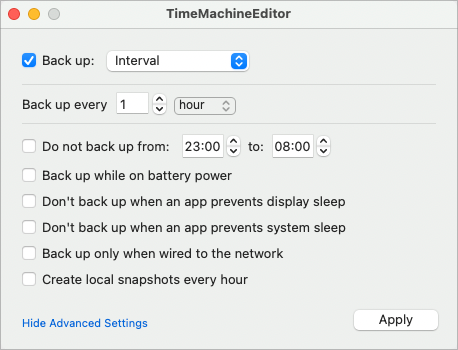
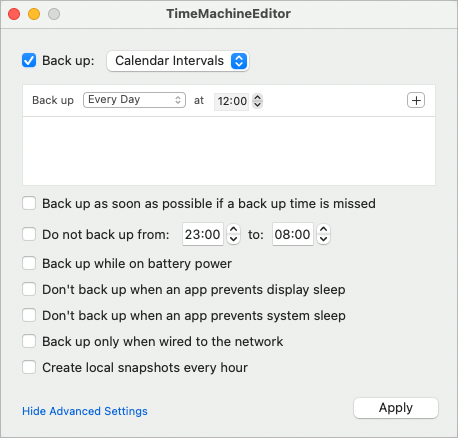
如果以上备份规则,满足不了备份需求,可以使用 TimeMachineEditor 来修改备份规则。
有三种模式,一次设置永久生效,根据需求选择。
备份加密
加密一定要在第一次备份时勾选上,不然巨慢无比,还影响电脑使用。
全速备份
临时开启全速备份
sudo sysctl debug.lowpri_throttle_enabled=0
关闭全速备份
sudo sysctl debug.lowpri_throttle_enabled=1
因为是内核参数,所有重启后就失效,如果需要持久化。可以创建 plist 文件现实开机调整。
/Library/LaunchDaemons/fix-el-capitan-slow-time-machine-speed.plist
<?xml version="1.0" encoding="UTF-8"?>
<!DOCTYPE plist PUBLIC "-//Apple//DTD PLIST 1.0//EN" "http://www.apple.com/DTDs/PropertyList-1.0.dtd">
<plist version="1.0">
  <dict>
    <key>Label</key>
    <string>fix-el-capitan-slow-time-machine-speed</string>
    <key>ProgramArguments</key>
    <array>
      <string>/usr/sbin/sysctl</string>
      <string>debug.lowpri_throttle_enabled=0</string>
    </array>
    <key>RunAtLoad</key>
    <true/>
  </dict>
</plist>
本地快照
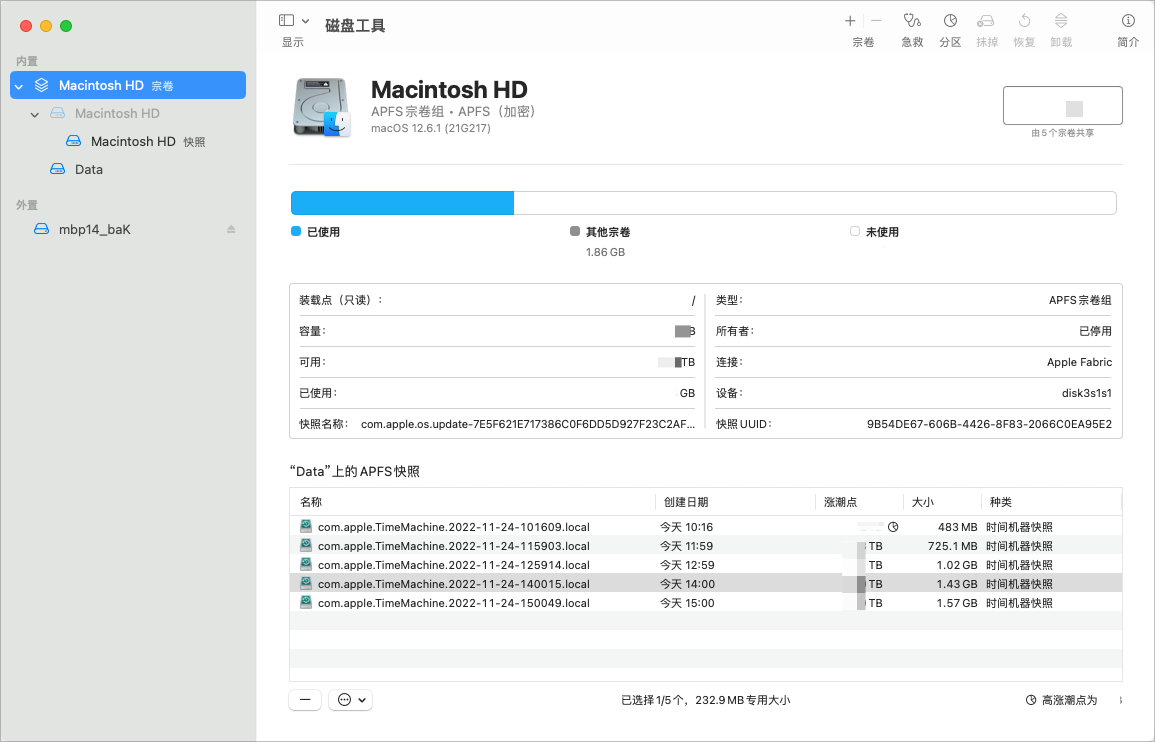
默认磁盘工具不显示本地快照。
磁盘工具
显示本地快照: 打开磁盘工具 – 显示 – 显示APFS 快照
命令工具 tmutil
tmutil可以查看,创建,删除,比较备份。
# 命令帮助
$ tmutil --help
Usage: tmutil version
Usage: tmutil enable
Usage: tmutil disable
Usage: tmutil startbackup [-a | --auto] [-b | --block] [-r | --rotation] [-d | --destination dest_id]
Usage: tmutil stopbackup
Usage: tmutil delete [-d backup_mount_point -t timestamp] [-p path]
Usage: tmutil deleteinprogress machine_directory
Usage: tmutil restore [-v] src ... dst
Usage: tmutil compare [-@acdefghlmnstuEX] [-D depth] [-I name]
       tmutil compare [-@acdefghlmnstuEX] [-D depth] [-I name] snapshot_path
       tmutil compare [-@acdefghlmnstuEUX] [-D depth] [-I name] path1 path2
Usage: tmutil setdestination [-a]  mount_point
       tmutil setdestination [-ap] afp://user[:pass]@host/share
Usage: tmutil removedestination destination_id
Usage: tmutil destinationinfo [-X]
Usage: tmutil addexclusion [-p|-v] item ...
Usage: tmutil removeexclusion [-p|-v] item ...
Usage: tmutil isexcluded item ...
Usage: tmutil inheritbackup machine_directory
       tmutil inheritbackup sparse_bundle
Usage: tmutil associatedisk [-a] mount_point volume_backup_directory
Usage: tmutil latestbackup [-m] [-t] [-d mount_point]
Usage: tmutil listbackups [-m] [-t] [-d mount_point]
Usage: tmutil machinedirectory
Usage: tmutil calculatedrift machine_directory
Usage: tmutil uniquesize path ...
Usage: tmutil verifychecksums path ...
Usage: tmutil localsnapshot
Usage: tmutil listlocalsnapshots <mount_point>
Usage: tmutil listlocalsnapshotdates [<mount_point>]
Usage: tmutil deletelocalsnapshots [<mount_point> | <snapshot_date>]
Usage: tmutil thinlocalsnapshots <mount_point> [purgeamount] [urgency]
# 查看备份目录
$ tmutil machinedirectory
/Volumes/mbp14_baK

# 显示备份列表
$ tmutil listbackups
2022-06-08-230014.backup
2022-06-16-231830.backup
2022-06-24-235123.backup
2022-07-12-112014.backup
2022-08-04-130307.backup
2022-08-12-144525.backup
2022-08-31-195349.backup

# 删除某次备份
$ sudo tmutil delete -d /Volumes/mbp14_baK -t 2022-10-25-185044
1 backups deleted

# 创建本地备份快照
$ tmutil localsnapshot
NOTE: local snapshots are considered purgeable and may be removed at any time by deleted(8).
Created local snapshot with date: 2022-11-24-100106

# 查看本地备份快照
$ tmutil listlocalsnapshots /Volumes
Snapshots for disk /Volumes:
com.apple.TimeMachine.2022-11-23-103230.local
com.apple.TimeMachine.2022-11-23-123035.local
com.apple.TimeMachine.2022-11-23-133050.local
com.apple.TimeMachine.2022-11-23-143137.local
com.apple.TimeMachine.2022-11-23-153214.local
com.apple.TimeMachine.2022-11-23-163224.local
com.apple.TimeMachine.2022-11-23-173240.local
com.apple.TimeMachine.2022-11-23-183324.local
com.apple.TimeMachine.2022-11-23-194631.local
com.apple.TimeMachine.2022-11-23-204639.local
com.apple.TimeMachine.2022-11-23-215552.local
com.apple.TimeMachine.2022-11-23-225606.local
com.apple.TimeMachine.2022-11-24-092927.local

# 删除本地备份快照
$ tmutil deletelocalsnapshots /Volumes
Deleted 16 Time Machine local snapshots for disk '/Volumes'
com.apple.TimeMachine.2022-11-24-100106.local
com.apple.TimeMachine.2022-11-23-163224.local

# 按时间列表查看快照
$ tmutil listlocalsnapshotdates
Snapshot dates for all disks:
2022-11-24-101609
2022-11-24-115903
2022-11-24-125914
2022-11-24-140015
2022-11-24-150049

# 按时间删除快照
$ tmutil deletelocalsnapshots 2022-11-24-150049
Deleted local snapshot '2022-11-24-150049'
备份内容分析
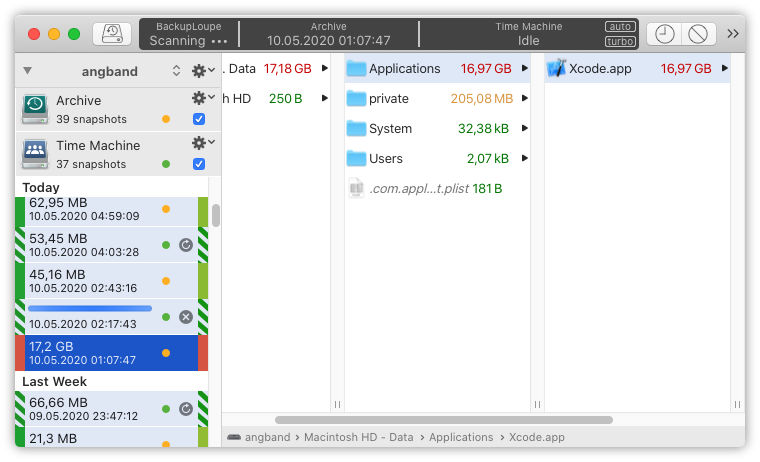
这个我没有使用,目前没有需求,所以一直在收藏夹中,并没有安装到电脑。